为什么选择 Godot 作为游戏引擎?
在众多游戏引擎中,我们选择 Godot 4.5 作为前端引擎,主要基于以下几个考虑:
(1)Godot 在 2D 游戏开发上有着天然的优势。赛博小镇是一个俯视角的 2D 像素风格游戏,Godot 的 2D 引擎非常成熟,提供了 TileMap、AnimatedSprite2D、CharacterBody2D 等专门为 2D 游戏设计的节点类型,开发效率远高于 Unity 等引擎。Godot 的场景系统(Scene System)让我们可以将玩家、NPC、UI 等元素封装成独立的场景,然后在主场景中实例化,这种组件化的设计非常适合我们的需求。
(2)Godot 是完全开源且免费的。Godot 使用 MIT 许可证,没有任何版权费用或收入分成,这对于教学项目和开源项目非常友好。你可以自由地修改引擎源码,也可以将游戏商业化而不用担心授权问题。相比之下,Unity 虽然功能强大,但在 2024 年引入了运行时费用政策,引发了开发者社区的广泛争议。
(3)Godot 的学习成本极低。Godot 使用 GDScript 作为主要脚本语言,这是一种类似 Python 的动态类型语言,语法简洁易懂,学习曲线非常平缓。对于已经熟悉 Python 的读者来说,学习 GDScript 几乎没有门槛——变量声明、函数定义、控制流程等语法都与 Python 高度相似,你甚至可以在几小时内就上手编写游戏脚本。Godot 的节点树结构也非常直观,你可以在编辑器中直观地看到场景的层级关系,这对于初学者非常友好。
(4)Godot 与 Python 后端的集成非常简单。Godot 内置了 HTTPRequest 节点,可以轻松地与 FastAPI 后端进行 HTTP 通信。我们只需要创建一个 API 客户端脚本,封装所有的 API 调用,就可以在游戏中调用后端的 AI 能力。这种前后端分离的架构让我们可以独立开发和测试游戏逻辑和 AI 逻辑,大大提高了开发效率。
当然,Godot 也有一些局限性。比如,Godot 的 3D 能力相比 Unreal Engine 和 Unity 还有差距,如果你要开发大型 3D 游戏,可能需要考虑其他引擎。但对于 2D 游戏、独立游戏和教学项目,Godot 是一个非常优秀的选择。
15.5.1 场景设计与资源组织
理解了 Godot 的场景系统后,我们来看看赛博小镇的场景设计。整个游戏由四个核心场景组成:Main(主场景)、Player(玩家)、NPC(非玩家角色)和 DialogueUI(对话界面)。每个场景都是一个独立的模块,可以单独编辑和测试,然后组合在一起形成完整的游戏。
赛博小镇的场景组织采用了模块化设计。我们首先创建三个基础场景:Player(玩家)、NPC(非玩家角色)和 DialogueUI(对话界面)。然后在 Main(主场景)中将这些场景实例化并组合起来。特别值得注意的是,三个 NPC(张三、李四、王五)都是同一个 NPC 场景的实例,只是通过脚本参数设置了不同的角色信息。
让我们先看看四个核心场景的结构,如图 15.12 所示:
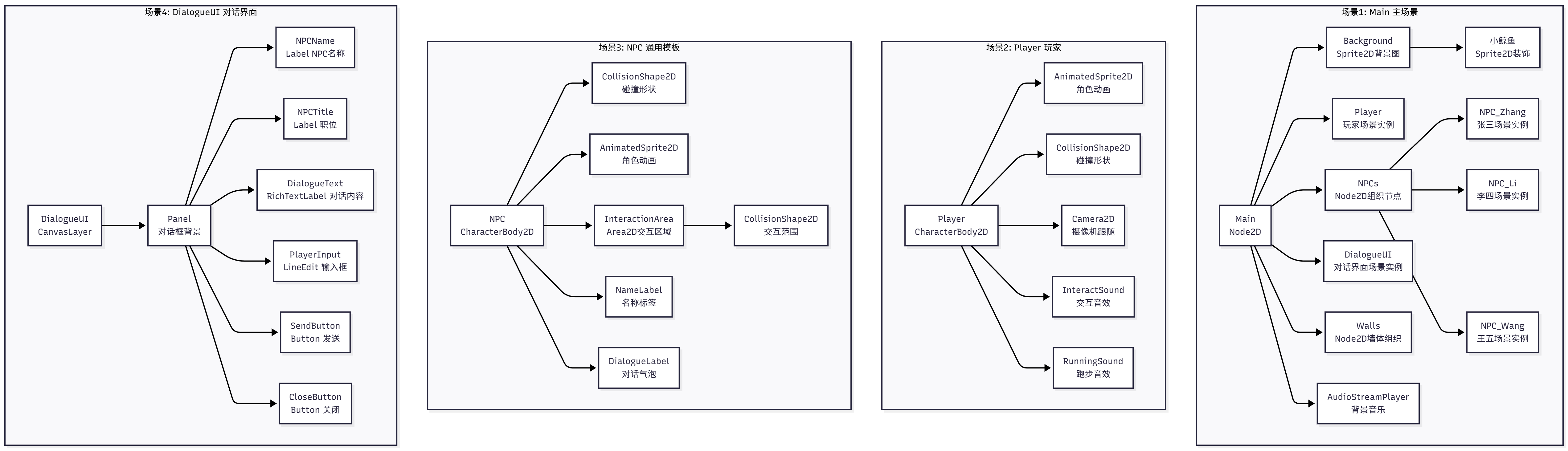
图 15.12 赛博小镇的四个核心场景
这个图展示了四个独立的场景及其内部结构。场景 1(Main)是主场景,它包含了背景图片(Sprite2D)、玩家实例、NPCs 组织节点(下面有三个 NPC 实例)、对话界面实例、墙体组织节点和背景音乐。注意,这里的 Player、NPC_Zhang、NPC_Li、NPC_Wang 和 DialogueUI 都是场景实例,不是普通节点。场景 2(Player)定义了玩家角色的结构,包含动画、碰撞、摄像机和两个音效节点。场景 3(NPC)是一个通用模板,张三、李四、王五都是这个场景的实例,包含碰撞、动画、交互区域和两个标签。场景 4(DialogueUI)是一个 CanvasLayer 节点,包含 Panel 和各种 UI 元素。
场景实例化的过程可以这样理解:我们在 Godot 编辑器中创建了 NPC.tscn 这个场景文件,定义了 NPC 的节点结构。然后在 Main 场景中,我们三次"实例化"这个 NPC 场景,创建了三个独立的副本,分别命名为 NPC_Zhang、NPC_Li 和 NPC_Wang。每个副本都有自己的位置和状态,但它们共享相同的节点结构。如果我们修改 NPC.tscn,比如给 NPC 添加一个新的音效节点,那么所有三个实例都会自动获得这个音效。
在 Godot 中创建这些场景的步骤如下:
-
创建 Player 场景:新建场景,选择 CharacterBody2D 作为根节点,添加 AnimatedSprite2D、CollisionShape2D、Camera2D、InteractSound 和 RunningSound 子节点,保存为 Player.tscn。
-
创建 NPC 场景:新建场景,选择 CharacterBody2D 作为根节点,添加 CollisionShape2D、AnimatedSprite2D、InteractionArea(Area2D,下面有 CollisionShape2D)、NameLabel 和 DialogueLabel 子节点,保存为 NPC.tscn。
-
创建 DialogueUI 场景:新建场景,选择 CanvasLayer 作为根节点,添加 Panel 子节点,在 Panel 下添加 NPCName、NPCTitle、DialogueText(RichTextLabel)、PlayerInput(LineEdit)、SendButton 和 CloseButton,保存为 DialogueUI.tscn。
-
创建 Main 场景:新建场景,选择 Node2D 作为根节点,添加 Background(Sprite2D)作为背景图,在 Background 下添加小鲸鱼装饰,然后实例化 Player 场景,创建 NPCs 节点并在其下三次实例化 NPC 场景,实例化 DialogueUI 场景,创建 Walls 节点用于组织墙体碰撞,最后添加 AudioStreamPlayer 播放背景音乐。
这种场景组织方式的优势在于:每个场景都是独立的,可以单独测试;NPC 使用同一个场景的实例,修改一次就能影响所有 NPC;场景之间通过信号通信,耦合度低,易于维护和扩展。
15.5.2 玩家控制实现
玩家角色是游戏中最重要的元素之一。我们需要实现 WASD 移动控制、动画切换、碰撞检测、与 NPC 的交互,以及音效系统。
玩家场景的结构包括:一个 CharacterBody2D 作为根节点,负责物理移动和碰撞;一个 AnimatedSprite2D 显示角色动画;一个 CollisionShape2D 定义碰撞形状;一个 Camera2D 跟随玩家;两个 AudioStreamPlayer 分别播放交互音效和走路音效。
玩家控制脚本player.gd实现了移动、交互和音效逻辑:
extends CharacterBody2D

# 移动速度
@export var speed: float = 200.0

# 当前可交互的NPC
var nearby_npc: Node = null

# 交互状态(交互时禁用移动)
var is_interacting: bool = false

# 节点引用
@onready var animated_sprite: AnimatedSprite2D = $AnimatedSprite2D
@onready var camera: Camera2D = $Camera2D

# 音效引用
@onready var interact_sound: AudioStreamPlayer = null
@onready var running_sound: AudioStreamPlayer = null

# 走路音效状态
var is_playing_running_sound: bool = false

func _ready():
    # 添加到player组(重要!NPC需要通过这个组来识别玩家)
    add_to_group("player")

    # 获取音效节点(可选,如果不存在也不会报错)
    interact_sound = get_node_or_null("InteractSound")
    running_sound = get_node_or_null("RunningSound")

    # 启用相机
    camera.enabled = true

    # 播放默认动画
    if animated_sprite.sprite_frames != null and animated_sprite.sprite_frames.has_animation("idle"):
        animated_sprite.play("idle")

func _physics_process(_delta: float):
    # 如果正在交互,禁用移动
    if is_interacting:
        velocity = Vector2.ZERO
        move_and_slide()
        # 播放idle动画
        if animated_sprite.sprite_frames != null and animated_sprite.sprite_frames.has_animation("idle"):
            animated_sprite.play("idle")
        # 停止走路音效
        stop_running_sound()
        return

    # 获取输入方向
    var input_direction = Input.get_vector("ui_left", "ui_right", "ui_up", "ui_down")

    # 设置速度
    velocity = input_direction * speed

    # 移动
    move_and_slide()

    # 更新动画和朝向
    update_animation(input_direction)

    # 更新走路音效
    update_running_sound(input_direction)

func update_animation(direction: Vector2):
    """更新角色动画(支持4方向)"""
    if animated_sprite.sprite_frames == null:
        return

    # 根据移动方向播放动画
    if direction.length() > 0:
        # 移动中 - 判断主要方向
        if abs(direction.x) > abs(direction.y):
            # 左右移动
            if direction.x > 0:
                # 向右
                if animated_sprite.sprite_frames.has_animation("walk_right"):
                    animated_sprite.play("walk_right")
                    animated_sprite.flip_h = false
                elif animated_sprite.sprite_frames.has_animation("walk"):
                    animated_sprite.play("walk")
                    animated_sprite.flip_h = false
            else:
                # 向左
                if animated_sprite.sprite_frames.has_animation("walk_left"):
                    animated_sprite.play("walk_left")
                    animated_sprite.flip_h = false
                elif animated_sprite.sprite_frames.has_animation("walk"):
                    animated_sprite.play("walk")
                    animated_sprite.flip_h = true
        else:
            # 上下移动
            if direction.y > 0:
                # 向下
                if animated_sprite.sprite_frames.has_animation("walk_down"):
                    animated_sprite.play("walk_down")
                elif animated_sprite.sprite_frames.has_animation("walk"):
                    animated_sprite.play("walk")
            else:
                # 向上
                if animated_sprite.sprite_frames.has_animation("walk_up"):
                    animated_sprite.play("walk_up")
                elif animated_sprite.sprite_frames.has_animation("walk"):
                    animated_sprite.play("walk")
    else:
        # 静止
        if animated_sprite.sprite_frames.has_animation("idle"):
            animated_sprite.play("idle")

func _input(event: InputEvent):
    # 按E键与NPC交互
    if event is InputEventKey:
        if event.pressed and not event.echo:
            if event.keycode == KEY_E or event.keycode == KEY_ENTER:
                if nearby_npc != null:
                    interact_with_npc()

func interact_with_npc():
    """与附近的NPC交互"""
    if nearby_npc != null:
        # 播放交互音效
        if interact_sound:
            interact_sound.play()

        # 发送信号给对话系统
        get_tree().call_group("dialogue_system", "start_dialogue", nearby_npc.npc_name)

func set_nearby_npc(npc: Node):
    """设置附近的NPC"""
    nearby_npc = npc

func set_interacting(interacting: bool):
    """设置交互状态"""
    is_interacting = interacting
    if interacting:
        # 停止走路音效
        stop_running_sound()

func update_running_sound(direction: Vector2):
    """更新走路音效"""
    if running_sound == null:
        return

    # 如果正在移动
    if direction.length() > 0:
        # 如果音效还没播放,开始播放
        if not is_playing_running_sound:
            running_sound.play()
            is_playing_running_sound = true
    else:
        # 如果停止移动,停止音效
        stop_running_sound()

func stop_running_sound():
    """停止走路音效"""
    if running_sound and is_playing_running_sound:
        running_sound.stop()
        is_playing_running_sound = false
这个脚本实现了完整的玩家控制。玩家使用 WASD 键(或方向键)移动,角色会根据移动方向播放相应的 4 方向动画(walk_up/down/left/right)。当玩家靠近 NPC 时,NPC 会调用set_nearby_npc()设置自己为可交互对象,玩家按 E 键即可触发交互。交互时会播放音效,并通过call_group()通知对话系统开始对话。对话期间,set_interacting(true)会禁用玩家移动,对话结束后恢复移动。走路音效会在玩家移动时自动播放,停止时自动停止。
15.5.3 NPC 行为与交互
NPC 需要实现三个核心功能:在场景中随机巡逻游走、响应玩家的交互、显示对话气泡。我们使用 Area2D 来检测玩家是否靠近 NPC,当玩家进入交互范围时通知玩家,玩家按 E 键即可开始对话。
NPC 场景的结构包括:CharacterBody2D 作为根节点;CollisionShape2D 定义 NPC 的碰撞形状;AnimatedSprite2D 显示 NPC 动画;InteractionArea(Area2D)检测玩家进入交互范围,下面有 CollisionShape2D 定义交互范围;NameLabel 显示 NPC 名字;DialogueLabel 显示对话气泡。
NPC 脚本npc.gd实现了巡逻、交互和对话气泡逻辑:
extends CharacterBody2D

# NPC信息
@export var npc_name: String = "张三"
@export var npc_title: String = "Python工程师"

# NPC外观配置
@export var sprite_frames: SpriteFrames = null  # 自定义精灵帧资源

# NPC移动配置
@export var move_speed: float = 50.0  # 移动速度
@export var wander_enabled: bool = true  # 是否启用巡逻
@export var wander_range: float = 200.0  # 巡逻范围
@export var wander_interval_min: float = 3.0  # 最小巡逻间隔(秒)
@export var wander_interval_max: float = 8.0  # 最大巡逻间隔(秒)

# 当前对话内容(从后端获取)
var current_dialogue: String = ""

# 节点引用
@onready var animated_sprite: AnimatedSprite2D = $AnimatedSprite2D
@onready var interaction_area: Area2D = $InteractionArea
@onready var name_label: Label = $NameLabel
@onready var dialogue_label: Label = $DialogueLabel

# 玩家引用
var player: Node = null

# 巡逻相关变量
var wander_target: Vector2 = Vector2.ZERO  # 巡逻目标位置
var wander_timer: float = 0.0  # 巡逻计时器
var is_wandering: bool = false  # 是否正在巡逻
var is_interacting: bool = false  # 是否正在与玩家交互
var spawn_position: Vector2 = Vector2.ZERO  # 出生位置

func _ready():
    # 添加到npcs组
    add_to_group("npcs")

    # 设置NPC名字
    name_label.text = npc_name

    # 连接交互区域信号
    interaction_area.body_entered.connect(_on_body_entered)
    interaction_area.body_exited.connect(_on_body_exited)

    # 初始化对话标签
    dialogue_label.text = ""
    dialogue_label.visible = false

    # 设置自定义精灵帧(如果有)
    if sprite_frames != null:
        animated_sprite.sprite_frames = sprite_frames

    # 播放默认动画
    if animated_sprite.sprite_frames != null and animated_sprite.sprite_frames.has_animation("idle"):
        animated_sprite.play("idle")

    # 记录出生位置
    spawn_position = global_position

    # 初始化巡逻计时器
    if wander_enabled:
        wander_timer = randf_range(wander_interval_min, wander_interval_max)
        choose_new_wander_target()

func _on_body_entered(body: Node2D):
    """玩家进入交互范围"""
    if body.is_in_group("player"):
        player = body

        if player.has_method("set_nearby_npc"):
            player.set_nearby_npc(self)

func _on_body_exited(body: Node2D):
    """玩家离开交互范围"""
    if body.is_in_group("player"):
        if player != null and player.has_method("set_nearby_npc"):
            player.set_nearby_npc(null)
        player = null

func update_dialogue(dialogue: String):
    """更新NPC对话内容"""
    current_dialogue = dialogue
    dialogue_label.text = dialogue
    dialogue_label.visible = true

    # 10秒后隐藏对话
    await get_tree().create_timer(10.0).timeout
    dialogue_label.visible = false

func _physics_process(delta: float):
    """物理更新 - 处理移动"""
    # 如果正在与玩家交互,停止移动
    if is_interacting:
        velocity = Vector2.ZERO
        move_and_slide()
        # 播放idle动画
        if animated_sprite.sprite_frames != null and animated_sprite.sprite_frames.has_animation("idle"):
            animated_sprite.play("idle")
        return

    # 如果未启用巡逻,不移动
    if not wander_enabled:
        return

    # 更新巡逻计时器
    wander_timer -= delta

    # 如果计时器结束,选择新目标并开始移动
    if wander_timer <= 0:
        choose_new_wander_target()
        wander_timer = randf_range(wander_interval_min, wander_interval_max)

    # 如果正在巡逻,移动到目标
    if is_wandering:
        # 检查是否到达目标
        if global_position.distance_to(wander_target) < 10:
            # 到达目标,停止移动
            is_wandering = false
            velocity = Vector2.ZERO
            move_and_slide()
            # 播放idle动画
            if animated_sprite.sprite_frames != null and animated_sprite.sprite_frames.has_animation("idle"):
                animated_sprite.play("idle")
        else:
            # 继续移动到目标
            var direction = (wander_target - global_position).normalized()
            velocity = direction * move_speed
            move_and_slide()
            # 更新动画
            update_animation(direction)
    else:
        # 停止移动
        velocity = Vector2.ZERO
        move_and_slide()
        # 播放idle动画
        if animated_sprite.sprite_frames != null and animated_sprite.sprite_frames.has_animation("idle"):
            animated_sprite.play("idle")

func choose_new_wander_target():
    """选择新的巡逻目标"""
    # 在出生位置附近随机选择一个点
    var offset = Vector2(
        randf_range(-wander_range, wander_range),
        randf_range(-wander_range, wander_range)
    )
    wander_target = spawn_position + offset
    is_wandering = true

func update_animation(direction: Vector2):
    """更新动画"""
    if animated_sprite.sprite_frames == null:
        return

    if direction.length() > 0:
        # 移动动画
        if abs(direction.x) > abs(direction.y):
            # 左右移动
            if direction.x > 0:
                if animated_sprite.sprite_frames.has_animation("walk_right"):
                    animated_sprite.play("walk_right")
                elif animated_sprite.sprite_frames.has_animation("walk"):
                    animated_sprite.play("walk")
                    animated_sprite.flip_h = false
            else:
                if animated_sprite.sprite_frames.has_animation("walk_left"):
                    animated_sprite.play("walk_left")
                elif animated_sprite.sprite_frames.has_animation("walk"):
                    animated_sprite.play("walk")
                    animated_sprite.flip_h = true
        else:
            # 上下移动
            if direction.y > 0:
                if animated_sprite.sprite_frames.has_animation("walk_down"):
                    animated_sprite.play("walk_down")
                elif animated_sprite.sprite_frames.has_animation("walk"):
                    animated_sprite.play("walk")
            else:
                if animated_sprite.sprite_frames.has_animation("walk_up"):
                    animated_sprite.play("walk_up")
                elif animated_sprite.sprite_frames.has_animation("walk"):
                    animated_sprite.play("walk")
    else:
        # 静止动画
        if animated_sprite.sprite_frames.has_animation("idle"):
            animated_sprite.play("idle")

func set_interacting(interacting: bool):
    """设置交互状态"""
    is_interacting = interacting
这个脚本实现了 NPC 的完整行为。NPC 会在出生位置附近的wander_range范围内随机巡逻,每隔wander_interval_min到wander_interval_max秒选择一个新的目标点并移动过去。移动时会播放 4 方向动画(walk_up/down/left/right),到达目标后停止并播放 idle 动画。当玩家进入 InteractionArea 时,NPC 会调用玩家的set_nearby_npc(self)方法,将自己设置为可交互对象。玩家按 E 键后,对话系统会调用 NPC 的set_interacting(true)方法,NPC 停止移动。对话结束后调用set_interacting(false),NPC 恢复巡逻。主场景会定时调用update_dialogue()方法更新 NPC 的对话气泡,显示 NPC 之间的自主对话内容。