12.3.1 GAIA 基准介绍
GAIA (General AI Assistants) 是由 Meta AI 和 Hugging Face 联合推出的评估基准,专注于评估 AI 助手的通用能力[2]。与 BFCL 专注于工具调用不同,GAIA 评估的是智能体在真实世界任务中的综合表现。
GAIA 的设计理念是:真实世界的问题往往需要多种能力的综合运用。一个优秀的 AI 助手不仅需要调用工具,还需要:
- 多步推理:将复杂问题分解为多个子问题
- 知识运用:利用内置知识和外部知识库
- 多模态理解:处理文本、图片、文件等多种输入
- 网页浏览:从互联网获取最新信息
- 文件操作:读取和处理各种格式的文件
(1)GAIA 数据集结构
了解 GAIA 的评估理念后,让我们深入了解 GAIA 数据集的具体结构。GAIA 包含 466 个精心设计的真实世界问题,这些问题按照复杂度和所需推理步骤分为三个难度级别,从简单的零步推理任务到需要多步复杂推理的困难任务,全面覆盖了智能体在实际应用中可能遇到的各种场景,如表 12.3 所示:
表 12.3 GAIA 数据集难度级别分布

{
  "task_id": "gaia_001",
  "Question": "What is the total population of the top 3 most populous cities in California?",
  "Level": 2,
  "Final answer": "12847521",
  "file_name": "",
  "file_path": "",
  "Annotator Metadata": {
    "Steps": [
      "Search for most populous cities in California",
      "Get population data for top 3 cities",
      "Sum the populations"
    ],
    "Number of steps": 3,
    "How long did this take?": "5 minutes",
    "Tools": ["web_search", "calculator"]
  }
}
关键字段说明:
Question: 问题描述Level: 难度级别(1-3)Final answer: 标准答案(可能是数字、文本或文件)file_name/file_path: 附件文件(如果有)Annotator Metadata: 标注者提供的元数据(推理步骤、所需工具等)
(2)准精确匹配介绍
GAIA 使用准精确匹配(Quasi Exact Match)评估算法,这是 GAIA 官方定义的评估标准。该算法的核心思想是:先对答案进行归一化处理,然后进行精确匹配。
给定预测答案 和标准答案 ,准精确匹配函数定义为:
其中 是归一化函数,根据答案类型应用不同的规则。
归一化函数根据答案类型应用不同的规则。对于数字类型,需要移除逗号分隔符(1,000 → 1000)和单位符号($100 → 100,50% → 50),例如"$1,234.56"归一化为"1234.56"。对于字符串类型,需要转换为小写("Apple" → "apple")、移除冠词("the apple" → "apple")、移除多余空格("hello world" → "hello world")和移除末尾标点("hello." → "hello"),例如"The United States"归一化为"united states"。对于列表类型,需要按逗号分隔元素,对每个元素应用字符串归一化,按字母顺序排序后重新连接,例如"Paris, London, Berlin"归一化为"berlin,london,paris"。
归一化示例:
# 数字答案
原始答案: "$1,234.56"
归一化后: "1234.56"

# 字符串答案
原始答案: "The United States of America"
归一化后: "united states of america"

# 列表答案
原始答案: "Paris, London, Berlin"
归一化后: "berlin, london, paris"
(3)GAIA 评估指标
GAIA 使用以下指标评估智能体性能:
1. 精确匹配率 (Exact Match Rate)
精确匹配率是 GAIA 的核心指标,定义为准精确匹配成功的样本比例:
其中:
- 是总样本数
- 是第 个样本的预测答案
- 是第 个样本的标准答案
- 是准精确匹配函数
2. 分级准确率 (Level-wise Accuracy)
对于每个难度级别 ,计算该级别的准确率:
其中 是难度级别 的样本集合, 是该级别的样本数。
3. 难度递进下降率 (Difficulty Progression Drop Rate)
衡量智能体在难度增加时的性能衰减:
- :从 Level 1 到 Level 2 的下降率
- :从 Level 2 到 Level 3 的下降率
4. 平均推理步骤数 (Average Reasoning Steps)
评估智能体完成任务所需的平均步骤数:
其中 是正确回答的样本数, 是第 个样本的推理步骤数。
指标解释:
- Exact Match Rate = 1.0:所有样本都完全正确
- Exact Match Rate = 0.5:50%的样本正确,50%的样本错误
- Drop Rate = 0.3:难度增加导致准确率下降 30%
- Drop Rate = 0.0:难度增加不影响准确率(理想情况)
评估示例:
假设我们评估了 10 个样本,结果可以参考表 12.4 所示:
表 12.4 GAIA 数据集难度级别分布
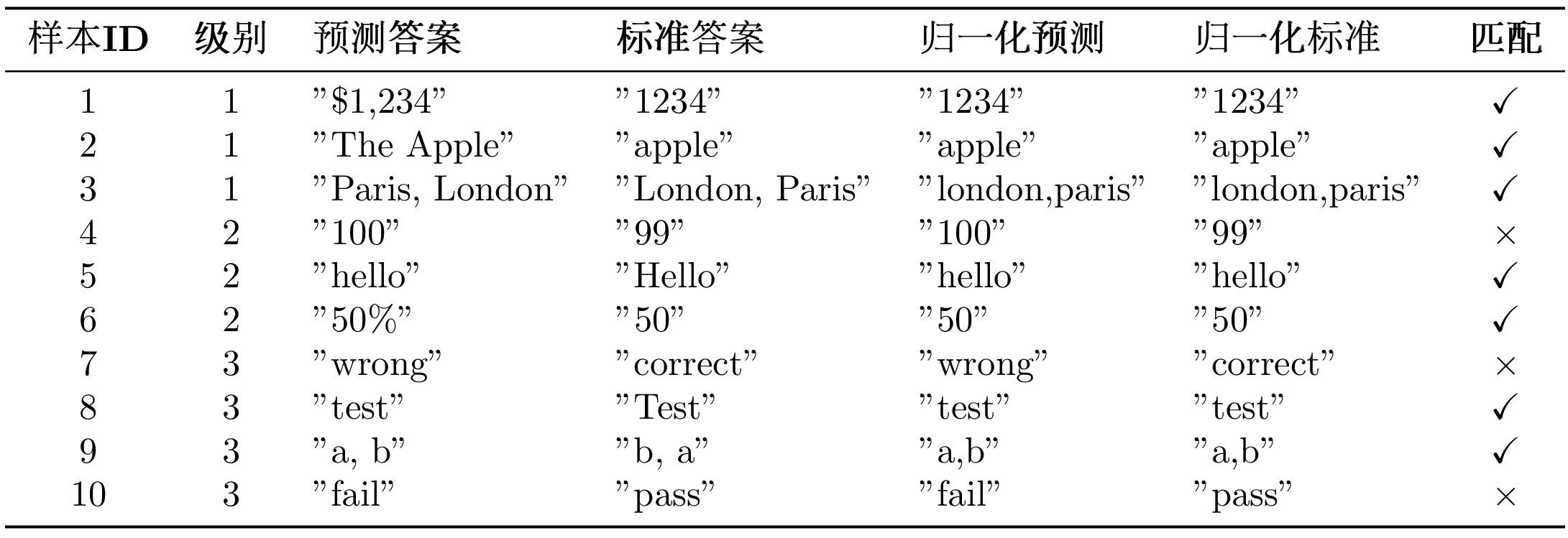
如果要计算这个案例的指标的话,可以参考下面的 Python 脚本。
# 1. 精确匹配率
total_samples = 10
correct_samples = 7  # 样本1,2,3,5,6,8,9
exact_match_rate = correct_samples / total_samples = 0.70  # 70%

# 2. 分级准确率
level_1_correct = 3  # 样本1,2,3
level_1_total = 3
level_1_accuracy = 3 / 3 = 1.00  # 100%

level_2_correct = 2  # 样本5,6
level_2_total = 3
level_2_accuracy = 2 / 3 = 0.67  # 67%

level_3_correct = 2  # 样本8,9
level_3_total = 4
level_3_accuracy = 2 / 4 = 0.50  # 50%

# 3. 难度递进下降率
drop_rate_1_to_2 = (1.00 - 0.67) / 1.00 = 0.33  # 33%
drop_rate_2_to_3 = (0.67 - 0.50) / 0.67 = 0.25  # 25%

print(f"精确匹配率: {exact_match_rate:.2%}")  # 70.00%
print(f"Level 1准确率: {level_1_accuracy:.2%}")  # 100.00%
print(f"Level 2准确率: {level_2_accuracy:.2%}")  # 66.67%
print(f"Level 3准确率: {level_3_accuracy:.2%}")  # 50.00%
print(f"Level 1→2 下降率: {drop_rate_1_to_2:.2%}")  # 33.00%
print(f"Level 2→3 下降率: {drop_rate_2_to_3:.2%}")  # 25.00%
结果分析:
- 整体表现:70%的精确匹配率,表现良好
- 难度敏感性:从 Level 1 到 Level 2 下降 33%,说明智能体在中等难度任务上有明显衰减
- 能力边界:Level 3 准确率为 50%,说明智能体在复杂任务上仍有提升空间
下降率越大,说明智能体在处理复杂任务时的能力衰减越明显。
(4)GAIA 官方系统提示词
GAIA 要求使用特定的系统提示词,确保模型输出符合评估格式:
GAIA_SYSTEM_PROMPT = """You are a general AI assistant. I will ask you a question. Report your thoughts, and finish your answer with the following template: FINAL ANSWER: [YOUR FINAL ANSWER].

YOUR FINAL ANSWER should be a number OR as few words as possible OR a comma separated list of numbers and/or strings.

If you are asked for a number, don't use comma to write your number neither use units such as $ or percent sign unless specified otherwise.

If you are asked for a string, don't use articles, neither abbreviations (e.g. for cities), and write the digits in plain text unless specified otherwise.

If you are asked for a comma separated list, apply the above rules depending of whether the element to be put in the list is a number or a string."""
GAIA 对答案格式有严格的要求:答案必须以FINAL ANSWER: [答案]的格式给出;对于数字类型的答案,不使用逗号分隔符和单位符号;对于字符串类型的答案,不使用冠词和缩写;对于列表类型的答案,使用逗号分隔并按字母顺序排列。
12.3.2 获取 GAIA 数据集
重要提示:GAIA 是受限数据集(Gated Dataset),需要先在 HuggingFace 上申请访问权限。
步骤 1:申请访问权限
- 访问 https://huggingface.co/datasets/gaia-benchmark/GAIA
- 点击"Request access"按钮
- 填写申请表单(通常会在几秒内批准)
- 获取你的 HuggingFace Token:https://huggingface.co/settings/tokens
步骤 2:配置环境变量
在.env文件中添加你的 HuggingFace Token:
# HuggingFace API 配置
HF_TOKEN=hf_your_token_here
方法 1:使用 HelloAgents 自动下载(推荐)
HelloAgents 会自动处理 GAIA 数据集的下载和缓存:
from hello_agents.evaluation import GAIADataset
import os

# 确保设置了HF_TOKEN,如果设置了.env无需这一行
os.environ["HF_TOKEN"] = "hf_your_token_here"

# 自动下载到 ./data/gaia/
dataset = GAIADataset(
    dataset_name="gaia-benchmark/GAIA",
    split="validation",  # 或 "test"
    level=1  # 可选: 1, 2, 3, None(全部)
)
items = dataset.load()

print(f"加载了 {len(items)} 个测试样本")
# 输出: 加载了 53 个测试样本 (Level 1)
工作原理:
- 首次运行时,使用
snapshot_download下载整个数据集到./data/gaia/ - 数据集包含 114 个文件(问题、图片、PDF 等材料)
- 后续使用直接从本地加载,速度很快
数据集目录结构:
./data/gaia/
├── 2023/
│   ├── validation/
│   │   ├── metadata.jsonl  (165个问题)
│   │   ├── *.png, *.pdf, *.csv, *.xlsx  (附件文件)
│   └── test/
│       ├── metadata.jsonl  (301个问题)
│       └── ... (附件文件)
├── GAIA.py
└── README.md
方法 2:手动下载
如果你想手动下载数据集:
from huggingface_hub import snapshot_download
import os

# 设置Token
os.environ["HF_TOKEN"] = "hf_your_token_here"

# 下载数据集
snapshot_download(
    repo_id="gaia-benchmark/GAIA",
    repo_type="dataset",
    local_dir="./data/gaia",
    token=os.getenv("HF_TOKEN")
)
查看数据集统计:
# 查看数据集统计
stats = dataset.get_statistics()
print(f"总样本数: {stats['total_samples']}")
print(f"级别分布: {stats['level_distribution']}")
# 输出:
# 总样本数: 165
# 级别分布: {1: 53, 2: 62, 3: 50}
12.3.3 在 HelloAgents 中实现 GAIA 评估
与 BFCL 类似,我们提供两种评估方式,推荐使用方式 1。
方式 1:使用 GAIAEvaluationTool 一键评估
这是最简单的方式,自动完成数据集下载、评估执行、结果导出和报告生成:
from hello_agents import SimpleAgent, HelloAgentsLLM
from hello_agents.tools import GAIAEvaluationTool

# GAIA官方系统提示词(来自论文)
GAIA_SYSTEM_PROMPT = """You are a general AI assistant. I will ask you a question. Report your thoughts, and finish your answer with the following template: FINAL ANSWER: [YOUR FINAL ANSWER].

YOUR FINAL ANSWER should be a number OR as few words as possible OR a comma separated list of numbers and/or strings.

If you are asked for a number, don't use comma to write your number neither use units such as $ or percent sign unless specified otherwise.

If you are asked for a string, don't use articles, neither abbreviations (e.g. for cities), and write the digits in plain text unless specified otherwise.

If you are asked for a comma separated list, apply the above rules depending of whether the element to be put in the list is a number or a string."""

# 1. 创建智能体(使用GAIA官方系统提示词)
llm = HelloAgentsLLM()
agent = SimpleAgent(
    name="TestAgent",
    llm=llm,
    system_prompt=GAIA_SYSTEM_PROMPT  # 关键:使用GAIA官方提示词
)

# 2. 创建GAIA评估工具
gaia_tool = GAIAEvaluationTool()

# 3. 一键运行评估
results = gaia_tool.run(
    agent=agent,
    level=1,  # Level 1: 简单任务
    max_samples=5,  # 评估5个样本
    export_results=True,  # 导出GAIA格式结果
    generate_report=True  # 生成评估报告
)

# 4. 查看结果
print(f"精确匹配率: {results['exact_match_rate']:.2%}")
print(f"部分匹配率: {results['partial_match_rate']:.2%}")
print(f"正确数: {results['exact_matches']}/{results['total_samples']}")
运行结果:
============================================================
GAIA一键评估
============================================================

配置:
   智能体: TestAgent
   难度级别: 1
   样本数量: 5

============================================================
步骤1: 运行HelloAgents评估
============================================================
   正在从HuggingFace下载: gaia-benchmark/GAIA
   📥 下载GAIA数据集...
   ✓ 数据集下载完成
   ✓ 加载了 165 个样本
✅ GAIA数据集加载完成
   数据源: gaia-benchmark/GAIA
   分割: validation
   级别: 1
   样本数: 53

🌟 开始 GAIA 评估...
   样本数量: 5
   进度: 5/5
✅ GAIA 评估完成
   精确匹配率: 80.00%
   部分匹配率: 80.00%

============================================================
步骤2: 导出GAIA格式结果
============================================================
✅ GAIA格式结果已导出
   输出文件: evaluation_results\gaia_official\gaia_level1_result_20251011_012648.jsonl
   样本数: 5
   包含推理轨迹: True
📄 提交说明已生成: evaluation_results\gaia_official\SUBMISSION_GUIDE_20251011_012648.md

============================================================
步骤3: 生成评估报告
============================================================
📄 报告已生成: evaluation_reports\gaia_report_20251011_012648.md

============================================================
🎯 最终结果
============================================================
   精确匹配率: 80.00%
   部分匹配率: 80.00%
   正确数: 4/5
评估完成后会自动生成三类文件:首先是 GAIA 格式结果文件(evaluation_results/gaia_official/gaia_level1_result_*.jsonl),采用 JSONL 格式(每行一个 JSON 对象),可直接用于提交到 GAIA 排行榜;其次是提交说明文件(evaluation_results/gaia_official/SUBMISSION_GUIDE_*.md),包含详细的提交步骤、结果文件格式说明和注意事项;最后是评估报告(evaluation_reports/gaia_report_*.md),包含评估结果摘要、详细指标、样本详情和可视化图表。
注意:如果你发现生成的评估结果不理想(例如准确率较低),这是正常现象。虽然 Level 1 是一步推理任务,但仍然需要智能体具备工具调用能力(如搜索引擎、计算器等)才能正确回答问题。我们当前使用的 SimpleAgent 主要用于演示评估流程,在工具调用能力上还有提升空间。
方式 2:使用 Dataset + Evaluator(灵活定制)
如果需要更细粒度的控制,可以直接使用底层组件:
from hello_agents.evaluation import GAIADataset, GAIAEvaluator

# 1. 加载数据集
dataset = GAIADataset(level=1)
items = dataset.load()
print(f"加载了 {len(items)} 个样本")

# 2. 创建评估器
evaluator = GAIAEvaluator(dataset=dataset, level=1)

# 3. 运行评估
results = evaluator.evaluate(agent, max_samples=5)

# 4. 导出GAIA格式结果
evaluator.export_to_gaia_format(
    results,
    "gaia_results.jsonl",
    include_reasoning=True
)
生成的评估报告(gaia_report_*.md)可参考下面的文件:
# GAIA评估报告

**生成时间**: 2025-10-11 01:26:48

## 📊 评估概览

- **智能体**: TestAgent
- **难度级别**: 1
- **总样本数**: 2
- **精确匹配数**: 1
- **部分匹配数**: 1
- **精确匹配率**: 50.00%
- **部分匹配率**: 50.00%

## 📈 详细指标

### 分级准确率

- **Level 1**: 50.00% 精确 / 50.00% 部分 (1/2)

## 📝 样本详情(前10个)

| 任务ID | 级别 | 预测答案 | 正确答案 | 精确匹配 | 部分匹配 |
|--------|------|----------|----------|----------|----------|
| e1fc63a2-da7a-432f-be78-7c4a95598703 | 1 | 24000 | 17 | ❌ | ❌ |
| 8e867cd7-cff9-4e6c-867a-ff5ddc2550be | 1 | 3 | 3 | ✅ | ✅ |

## 📊 准确率可视化

精确匹配: █████████████████████████░░░░░░░░░░░░░░░░░░░░░░░░░ 50.00%
部分匹配: █████████████████████████░░░░░░░░░░░░░░░░░░░░░░░░░ 50.00%


## 💡 建议

- ⚠️ 表现一般,需要改进。
- 💡 建议检查工具使用和多步推理能力。
**生成的 GAIA 格式结果(gaia_level1_result_*.jsonl):
{"task_id": "e1fc63a2-da7a-432f-be78-7c4a95598703", "model_answer": "24000", "reasoning_trace": "24000"}
{"task_id": "8e867cd7-cff9-4e6c-867a-ff5ddc2550be", "model_answer": "3", "reasoning_trace": "3"}
12.3.4 提交结果到 GAIA 官方排行榜
使用 GAIAEvaluationTool 运行评估后,会在evaluation_results/gaia_official/目录下生成提交所需的文件和详细的提交说明。
-
GAIA 格式结果文件**:
gaia_level1_result_*.jsonl{"task_id": "xxx", "model_answer": "答案", "reasoning_trace": "推理过程"} {"task_id": "yyy", "model_answer": "答案", "reasoning_trace": "推理过程"} -
提交说明文件:
SUBMISSION_GUIDE_*.md
打开自动生成的SUBMISSION_GUIDE_*.md文件,里面包含完整的提交指南:
具体来说,打开浏览器,访问:
https://huggingface.co/spaces/gaia-benchmark/leaderboard
如图 12.4 所示,提交表单中填写信息即可:
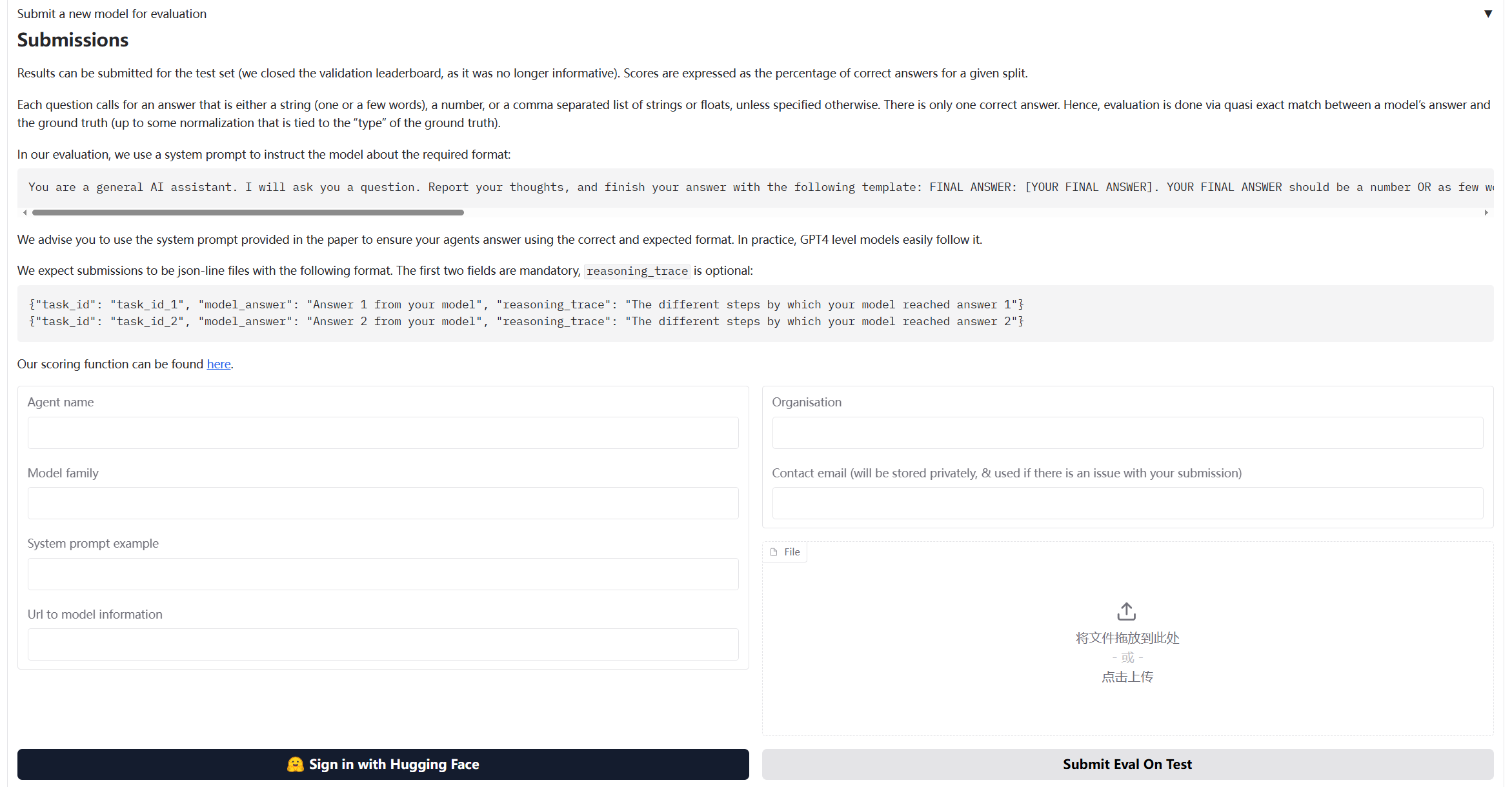
图 12.4 GAIA 评估流程图
提交前,可以手动检查生成的 JSON 文件:
import json

# 读取结果文件
with open("evaluation_results/gaia_official/gaia_level1_result_*.jsonl", "r") as f:
    for line in f:
        result = json.loads(line)
        print(f"Task ID: {result['task_id']}")
        print(f"Answer: {result['model_answer']}")
        print(f"Reasoning: {result['reasoning_trace']}")
        print("-" * 50)
12.3.5 核心组件实现细节
GAIA 评估系统的实现与 BFCL 类似,但针对通用能力评估有一些特殊的设计。
(1)GAIADataset:支持多模态的数据加载器
GAIA 数据集的特殊之处在于它包含多模态数据(文本、文件、图片等):
class GAIADataset:
    """GAIA数据集加载器

    支持从HuggingFace加载GAIA数据集(受限数据集)
    """

    def __init__(
        self,
        level: Optional[int] = None,
        split: str = "validation",
        local_data_dir: Optional[str] = None
    ):
        self.level = level
        self.split = split
        self.local_data_dir = local_data_dir or "./data/gaia"
        self.data = []

    def load(self) -> List[Dict[str, Any]]:
        """加载数据集"""
        # 从HuggingFace下载
        items = self._load_from_huggingface()

        # 按级别过滤
        if self.level:
            items = [item for item in items if item.get("level") == self.level]

        self.data = items
        return items

    def _load_from_huggingface(self) -> List[Dict[str, Any]]:
        """从HuggingFace下载GAIA数据集"""
        from huggingface_hub import snapshot_download
        import json

        # 下载数据集
        repo_id = "gaia-benchmark/GAIA"
        local_dir = snapshot_download(
            repo_id=repo_id,
            repo_type="dataset",
            local_dir=self.local_data_dir,
            local_dir_use_symlinks=False
        )

        # 加载JSONL文件
        data_file = Path(local_dir) / "2023" / self.split / "metadata.jsonl"
        items = []
        with open(data_file, 'r', encoding='utf-8') as f:
            for line in f:
                item = json.loads(line)
                items.append(self._standardize_item(item))

        return items
(2)GAIAEvaluator:实现 GAIA 官方评估算法
GAIA 的评估使用准精确匹配(Quasi Exact Match)算法,需要特殊的答案归一化和匹配逻辑:
class GAIAEvaluator:
    """GAIA评估器

    实现GAIA官方的准精确匹配(Quasi Exact Match)评估算法
    """

    def evaluate(self, agent: Any, max_samples: Optional[int] = None) -> Dict[str, Any]:
        """执行评估"""
        dataset_items = self.dataset.load()

        if max_samples:
            dataset_items = dataset_items[:max_samples]

        results = []
        for i, item in enumerate(dataset_items, 1):
            # 1. 构造提示词
            prompt = self._build_prompt(item["question"], item)

            # 2. 调用智能体
            response = agent.run(prompt)

            # 3. 提取答案(GAIA格式:FINAL ANSWER: [答案])
            predicted_answer = self._extract_answer(response)

            # 4. 归一化答案(GAIA官方规则)
            normalized_pred = self._normalize_answer(predicted_answer)
            normalized_truth = self._normalize_answer(item["final_answer"])

            # 5. 准精确匹配
            exact_match = (normalized_pred == normalized_truth)

            results.append({
                "task_id": item["task_id"],
                "predicted": predicted_answer,
                "expected": item["final_answer"],
                "exact_match": exact_match,
                "level": item.get("level", 0)
            })

        return self._format_results(results)
GAIA 使用特定的归一化规则来处理不同类型的答案:
def _normalize_answer(self, answer: str) -> str:
    """标准化答案字符串(GAIA官方标准化规则)

    规则:
    1. 数字:移除逗号分隔符和单位符号
    2. 字符串:移除冠词、转小写、移除多余空格
    3. 列表:逗号分隔,按字母顺序排序
    """
    if not answer:
        return ""

    answer = answer.strip()

    # 检查是否是逗号分隔的列表
    if ',' in answer:
        parts = [self._normalize_single_answer(p.strip()) for p in answer.split(',')]
        parts.sort()  # GAIA要求按字母顺序排序
        return ','.join(parts)
    else:
        return self._normalize_single_answer(answer)

def _normalize_single_answer(self, answer: str) -> str:
    """标准化单个答案(不包含逗号的答案)"""
    answer = answer.strip().lower()

    # 移除常见的冠词
    articles = ['the', 'a', 'an']
    words = answer.split()
    if words and words[0] in articles:
        words = words[1:]
        answer = ' '.join(words)

    # 移除货币符号和百分号
    answer = answer.replace('$', '').replace('%', '').replace('€', '').replace('£', '')

    # 移除数字中的逗号分隔符
    answer = re.sub(r'(\d),(\d)', r'\1\2', answer)

    # 移除多余空格
    answer = ' '.join(answer.split())

    # 移除末尾的标点符号
    answer = answer.rstrip('.,;:!?')

    return answer
GAIA 要求模型输出格式为FINAL ANSWER: [答案]:
def _extract_answer(self, response: str) -> str:
    """从响应中提取答案(GAIA格式)

    GAIA要求答案格式为:FINAL ANSWER: [答案]
    """
    # 首先尝试提取GAIA官方格式的答案
    final_answer_pattern = r'FINAL ANSWER:\s*(.+?)(?:\n|$)'
    match = re.search(final_answer_pattern, response, re.IGNORECASE | re.MULTILINE)
    if match:
        answer = match.group(1).strip()
        # 移除可能的方括号
        answer = answer.strip('[]')
        return answer

    # 备用方案:查找其他答案标记
    answer_patterns = [
        r'答案[::]\s*(.+)',
        r'最终答案[::]\s*(.+)',
        r'Final answer[::]\s*(.+)',
        r'Answer[::]\s*(.+)',
    ]

    for pattern in answer_patterns:
        match = re.search(pattern, response, re.IGNORECASE)
        if match:
            return match.group(1).strip()

    # 如果没有找到标记,返回最后一个非空行
    lines = response.strip().split('\n')
    for line in reversed(lines):
        line = line.strip()
        if line and not line.startswith('#'):
            return line

    return response.strip()
评估完成后,可以导出为 GAIA 官方要求的 JSONL 格式:
def export_to_gaia_format(
    self,
    results: Dict[str, Any],
    output_path: Union[str, Path],
    include_reasoning: bool = True
) -> None:
    """导出为GAIA官方格式(JSONL)

    GAIA要求的格式:
    {"task_id": "xxx", "model_answer": "答案", "reasoning_trace": "推理过程"}
    """
    output_path = Path(output_path)
    output_path.parent.mkdir(parents=True, exist_ok=True)

    with open(output_path, 'w', encoding='utf-8') as f:
        for result in results.get("detailed_results", []):
            entry = {
                "task_id": result["task_id"],
                "model_answer": result["predicted"]
            }

            if include_reasoning:
                entry["reasoning_trace"] = result.get("response", result["predicted"])

            f.write(json.dumps(entry, ensure_ascii=False) + '\n')
(3)GAIAEvaluationTool:一键评估工具
GAIAEvaluationTool 封装了完整的评估流程,提供一键评估功能:
class GAIAEvaluationTool(Tool):
    """GAIA评估工具

    提供一键评估功能:
    1. 运行HelloAgents评估
    2. 导出GAIA格式结果
    3. 生成评估报告
    4. 生成提交说明
    """

    def run(
        self,
        agent: Any,
        level: Optional[int] = None,
        max_samples: Optional[int] = None,
        local_data_dir: Optional[str] = None,
        export_results: bool = True,
        generate_report: bool = True
    ) -> Dict[str, Any]:
        """执行GAIA一键评估"""
        # 步骤1: 运行HelloAgents评估
        results = self._run_evaluation(agent, level, max_samples, local_data_dir)

        # 步骤2: 导出GAIA格式结果
        if export_results:
            self._export_results(results)

        # 步骤3: 生成评估报告
        if generate_report:
            self.generate_report(results)

        return results
GAIAEvaluationTool 会自动生成评估报告:
def generate_report(
    self,
    results: Dict[str, Any],
    output_file: Optional[Union[str, Path]] = None
) -> str:
    """生成评估报告"""
    report = f"""# GAIA评估报告

**生成时间**: {datetime.now().strftime("%Y-%m-%d %H:%M:%S")}

## 📊 评估概览

- **智能体**: {results.get("agent_name", "Unknown")}
- **难度级别**: {results.get("level_filter") or '全部'}
- **总样本数**: {results.get("total_samples", 0)}
- **精确匹配数**: {results.get("exact_matches", 0)}
- **精确匹配率**: {results.get("exact_match_rate", 0):.2%}

## 📈 详细指标

### 分级准确率

{self._format_level_metrics(results.get("level_metrics", {}))}

## 📝 样本详情(前10个)

{self._format_sample_details(results.get("detailed_results", [])[:10])}

## 📊 准确率可视化

{self._format_visualization(results.get("exact_match_rate", 0))}

## 💡 建议

{self._format_suggestions(results.get("exact_match_rate", 0))}
"""

    # 保存报告
    if output_file is None:
        output_dir = Path("./evaluation_reports")
        output_dir.mkdir(parents=True, exist_ok=True)
        output_file = output_dir / f"gaia_report_{datetime.now().strftime('%Y%m%d_%H%M%S')}.md"

    with open(output_file, 'w', encoding='utf-8') as f:
        f.write(report)

    return report