14.4.1 SearchTool 扩展
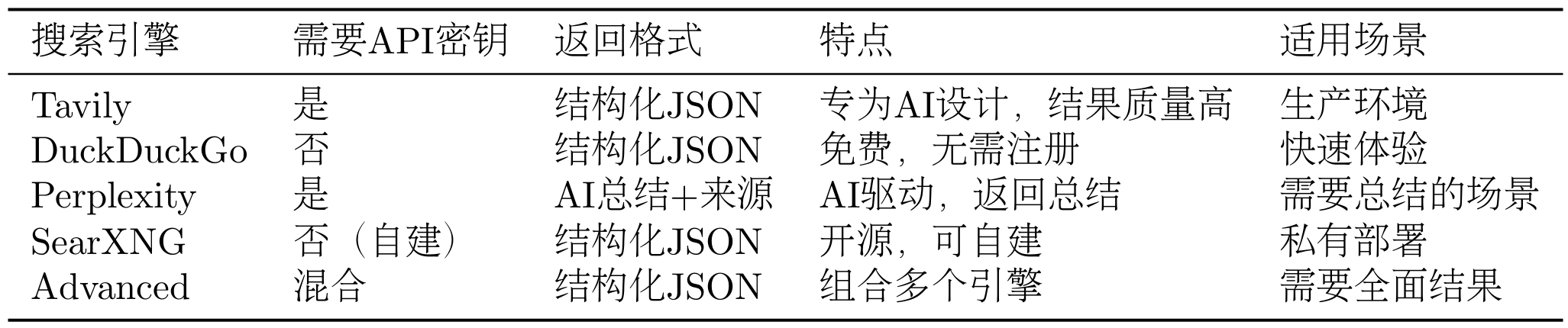
在第七章中,我们实现了SearchTool的基础版本,集成了 Tavily 和 SerpApi 两个搜索引擎,展示了多源搜索的设计思想。在本章的深度研究助手中,我们进一步扩展了SearchTool的能力,新增了 DuckDuckGo、Perplexity、SearXNG 等搜索引擎,并实现了 Advanced 模式(组合多个搜索引擎)。搜索是深度研究助手最核心的功能,这些扩展使得系统能够适应不同的使用场景和需求。
如表 14.2 所示,这次增加的搜索引擎有不同的特点和适用场景。
表 14.2 多搜索引擎对比
我们不再单独讨论如何扩展,可以参考源码以及第七章的拓展案例实现。SearchTool提供了统一的搜索接口,无论使用哪个搜索引擎,调用方式都是一样的。
在深度研究助手中,我们通过配置文件选择搜索引擎:
# config.py
class SearchAPI(str, Enum):
    TAVILY = "tavily"
    DUCKDUCKGO = "duckduckgo"
    PERPLEXITY = "perplexity"
    SEARXNG = "searxng"
    ADVANCED = "advanced"

class Configuration(BaseModel):
    search_api: SearchAPI = SearchAPI.DUCKDUCKGO
    # ...
# .env
SEARCH_API=tavily
这样,用户可以通过修改.env文件来选择搜索引擎,无需修改代码。
SearchTool返回的结果是一个字典,包含:
results:搜索结果列表,每个结果包含标题、URL、摘要backend:使用的搜索引擎answer:AI 生成的答案(仅 Perplexity)notices:通知信息(如 API 限制、错误等)
以下是一些特殊情况的处理。
搜索结果可能包含重复的 URL,我们需要去重:
def deduplicate_sources(sources: List[dict]) -> List[dict]:
    """去除重复的URL"""
    seen_urls = set()
    unique_sources = []

    for source in sources:
        if source["url"] not in seen_urls:
            seen_urls.add(source["url"])
            unique_sources.append(source)

    return unique_sources
搜索结果可能包含大量文本,我们需要限制每个来源的 Token 数量:
def limit_source_tokens(source: dict, max_tokens: int = 2000) -> dict:
    """限制来源的Token数量"""
    snippet = source["snippet"]

    # 简单的Token估算:1个Token约等于4个字符
    max_chars = max_tokens * 4

    if len(snippet) > max_chars:
        snippet = snippet[:max_chars] + "..."

    return {
        **source,
        "snippet": snippet
    }
14.4.2 NoteTool 使用
在深度研究助手中,我们使用NoteTool来持久化研究进度。NoteTool是第九章集成的内置工具,用于创建、读取、更新和删除笔记。
在研究过程中,我们需要记录每个子任务的搜索结果、总结以及最终的研究报告。这些信息需要持久化到磁盘,以便在研究过程中断时能够从上次的进度继续,同时也方便查看研究过程中的所有操作,分析研究的质量和效率。
NoteTool将笔记存储在指定的工作空间目录中,每个笔记是一个 Markdown 文件。笔记的文件名是任务 ID,内容包含任务标题、任务意图、搜索查询、搜索结果和总结。
最后生成的文件风格会是下面的树状图风格:
workspace/
├── notes/
│   ├── 1.md  # 任务1的笔记
│   ├── 2.md  # 任务2的笔记
│   ├── 3.md  # 任务3的笔记
│   └── ...
└── reports/
    └── final_report.md  # 最终报告
在深度研究助手中,我们使用NoteTool来记录每个子任务的研究进度:
class NotesService:
    def __init__(self, workspace: str):
        self.note_tool = NoteTool(workspace=workspace)

    def save_task_summary(
        self,
        task: TodoItem,
        search_results: List[dict],
        summary: str
    ):
        """保存任务总结"""
        # 格式化笔记内容
        content = self._format_note_content(
            task=task,
            search_results=search_results,
            summary=summary
        )

        # 创建笔记
        self.note_tool.run({
            "action": "create",
            "title": f"任务{task.id}:{task.title}",
            "content": content,
            "tags": ["research", "summary"]
        })

    def _format_note_content(
        self,
        task: TodoItem,
        search_results: List[dict],
        summary: str
    ) -> str:
        """格式化笔记内容"""
        content = f"# 任务{task.id}:{task.title}\n\n"
        content += f"## 任务信息\n\n"
        content += f"- **意图**:{task.intent}\n"
        content += f"- **查询**:{task.query}\n\n"

        content += f"## 搜索结果\n\n"
        for idx, result in enumerate(search_results, start=1):
            content += f"[{idx}] {result['title']}\n"
            content += f"URL: {result['url']}\n"
            content += f"摘要: {result['snippet']}\n\n"

        content += f"## 总结\n\n{summary}\n"

        return content
14.4.3 ToolRegistry 工具管理
ToolRegistry是 HelloAgents 框架的工具注册表,同样也是在我们的第七章所支持,用于管理所有工具的注册和调用。在深度研究助手中,我们使用ToolRegistry来管理SearchTool和NoteTool。
在创建 Agent 之前,我们需要先注册工具:
from hello_agents import ToolAwareSimpleAgent
from hello_agents.tools import ToolRegistry
from hello_agents.tools import SearchTool
from hello_agents.tools import NoteTool

# 创建工具
search_tool = SearchTool(backend="hybrid")
note_tool = NoteTool(workspace="./workspace/notes")

# 创建注册表
registry = ToolRegistry()

# 注册工具
registry.register_tool(search_tool)
registry.register_tool(note_tool)

# 创建Agent
agent = ToolAwareSimpleAgent(
    name="研究助手",
    system_prompt="你是一个研究助手",
    llm=llm,
    tool_registry=registry
)
当 Agent 需要调用工具时,它会生成工具调用指令,如图 14.7 所示。
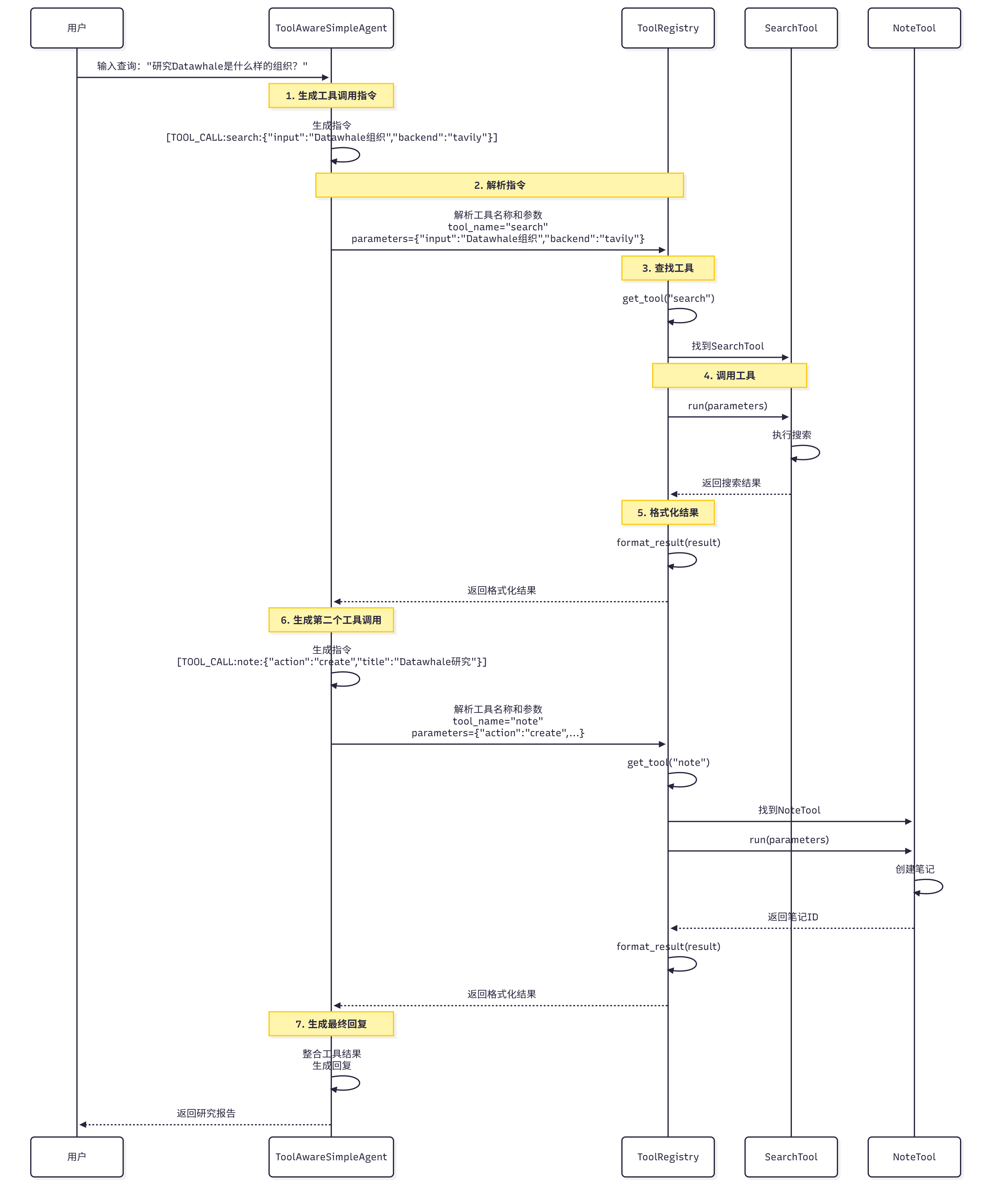
图 14.7 工具调用流程
**工具调用流程:
- Agent 生成指令:Agent 生成工具调用指令,如
[TOOL_CALL:search_tool:{"input": "Datawhale组织", "backend": "tavily"}] - 解析指令:
ToolRegistry解析指令,提取工具名称和参数 - 查找工具:
ToolRegistry根据工具名称查找对应的工具 - 调用工具:调用工具的
run方法,传入参数 - 返回结果:工具返回执行结果
- 格式化结果:将结果格式化为字符串,返回给 Agent